

Everyone's photos. All yours.
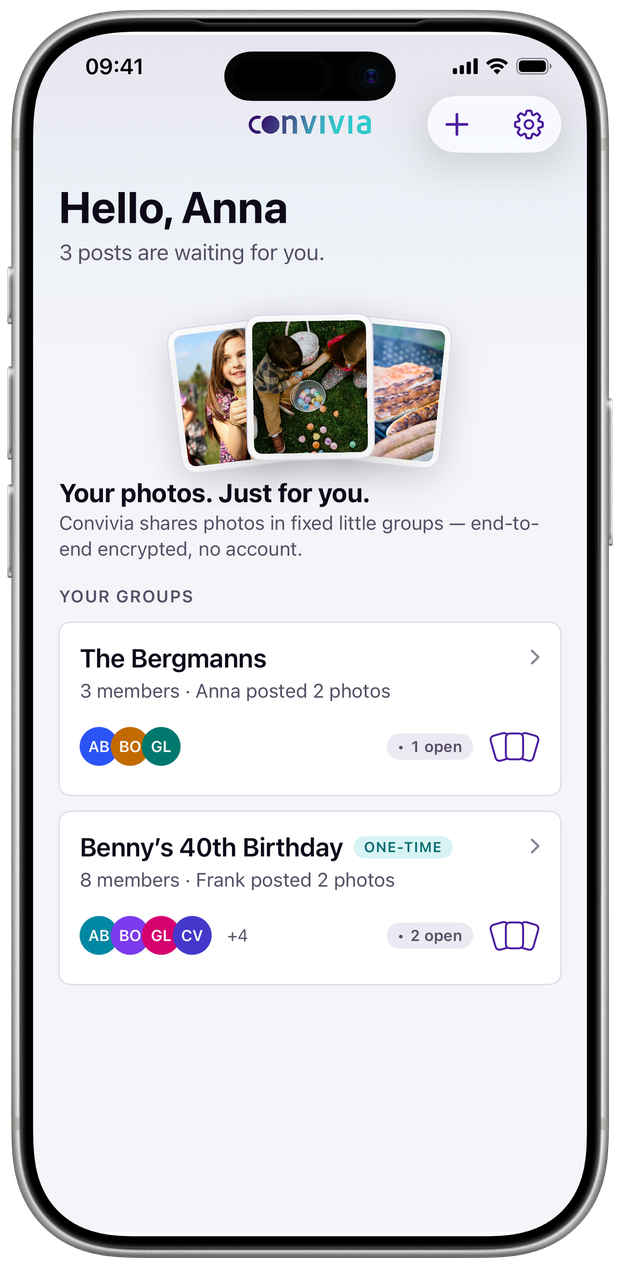
You share them in a fixed little group — your family, your friends, your hiking crew. Straight into everyone's photo libraries, end-to-end encrypted. Afterwards, everyone clears away their own.
Free through the end of October

Download once, keep it forever — from November it's a one-time $3.99 for iPhone, iPad and Mac together. No subscription, no account. You need iOS 18, iPadOS 18 or macOS 15 and an active iCloud account.
The problem
After the day is over, the photos sit on five phones — and nobody has the complete set.
The group chat gets a selection in poor quality. The shared folder gets set up and is forgotten two weeks later. Whoever has the good shots sends them one by one, if someone asks. In the end everyone has a little and nobody has everything.
The awkward part isn't the technology — it's the ownership: a shared album belongs to everyone and therefore to no one. It grows until someone cleans it up, and nobody ever does.
Convivia turns that around. A post belongs to the person who put it up, and it disappears when they delete it. What you save belongs to you and lives in your own library.
Where the photos live
Everyone carries their own bundle. Convivia lays them side by side.
There is no shared folder and no server in between. What you post stays in your iCloud storage — the others see it and take what they want to keep.
How it works
Post, save and mark done, delete.
Anna posts her picks
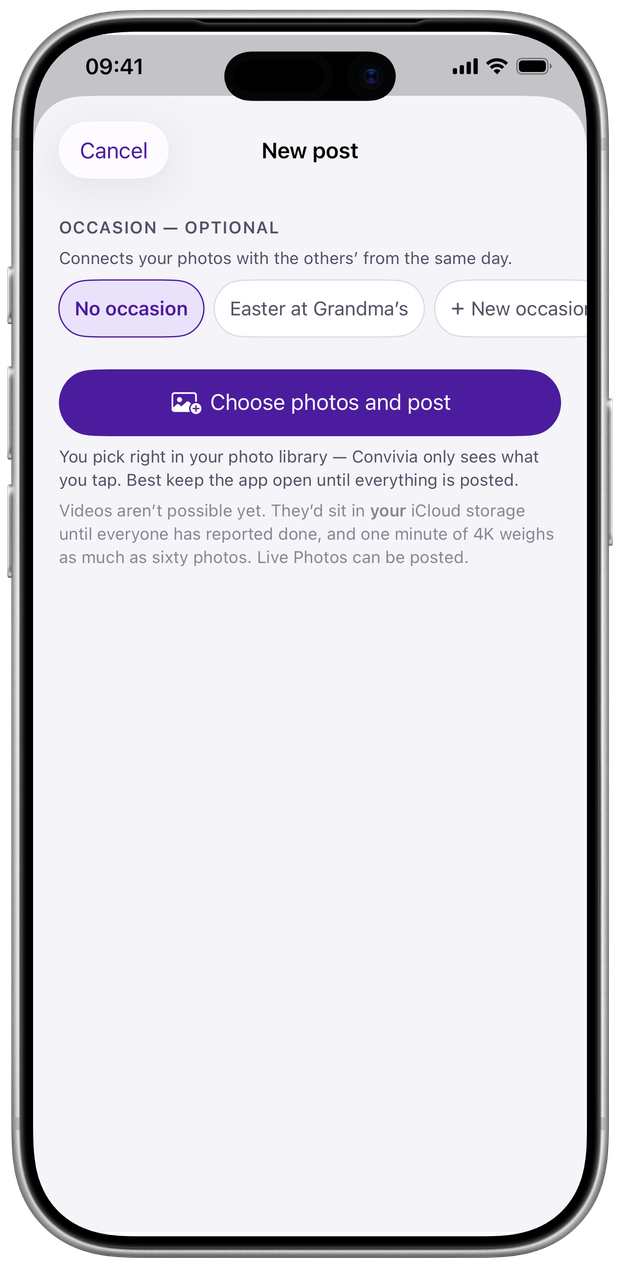
She attaches the post to an occasion like “Easter at Grandma's” and taps “Choose photos and post”. The picking happens in the system dialog — Convivia only ever sees the shots she taps, never her library; everything is encrypted on her device.
The others save and mark it done
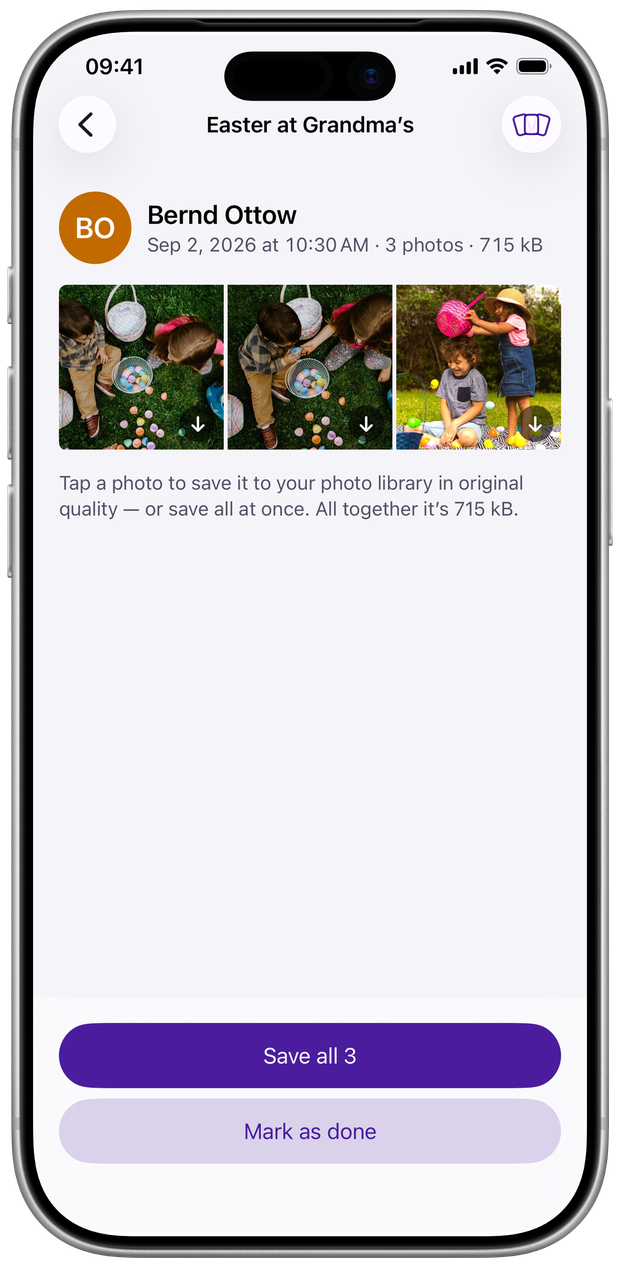
Everyone saves what they want to keep — everything, a few shots, or nothing — and marks the post as done. What you save lands in your own photo library in original quality. With several posts open, the Stack helps — see below.
Anna deletes the post
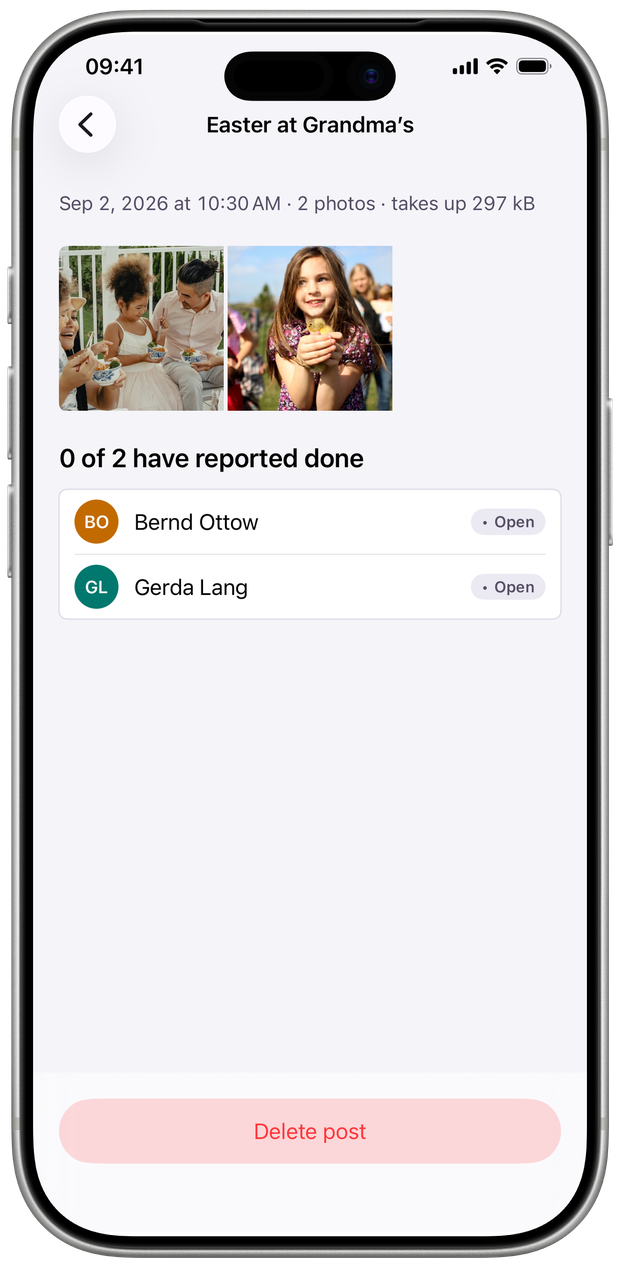
She sees who has marked it done, and clears it away when she likes. Nothing vanishes on its own, and nothing sits around because nobody is in charge.
The Stack
Flip through what's open like a deck of cards.
Three posts still open after a full weekend? The Stack deals you every photo one at a time: swipe right to save, swipe left to skip.
You'll find it wherever something is waiting — on the group card, in the group header, and in every post. And you can't swipe anything to pieces: the app only remembers your swipes and carries them out once you confirm at the end. Until then, every step can be undone.

iPhone, iPhone Duo, iPad and Mac
One app for every device you own.
On iPhone Duo, Convivia runs on the outer screen while closed; unfolded, your groups sit next to the posts — just like on iPad, where the Stack works in landscape too. On the Mac it's a proper Mac app — a fixed sidebar, keyboard shortcuts, settings in the menu bar, and photos dragged straight in from the Finder.
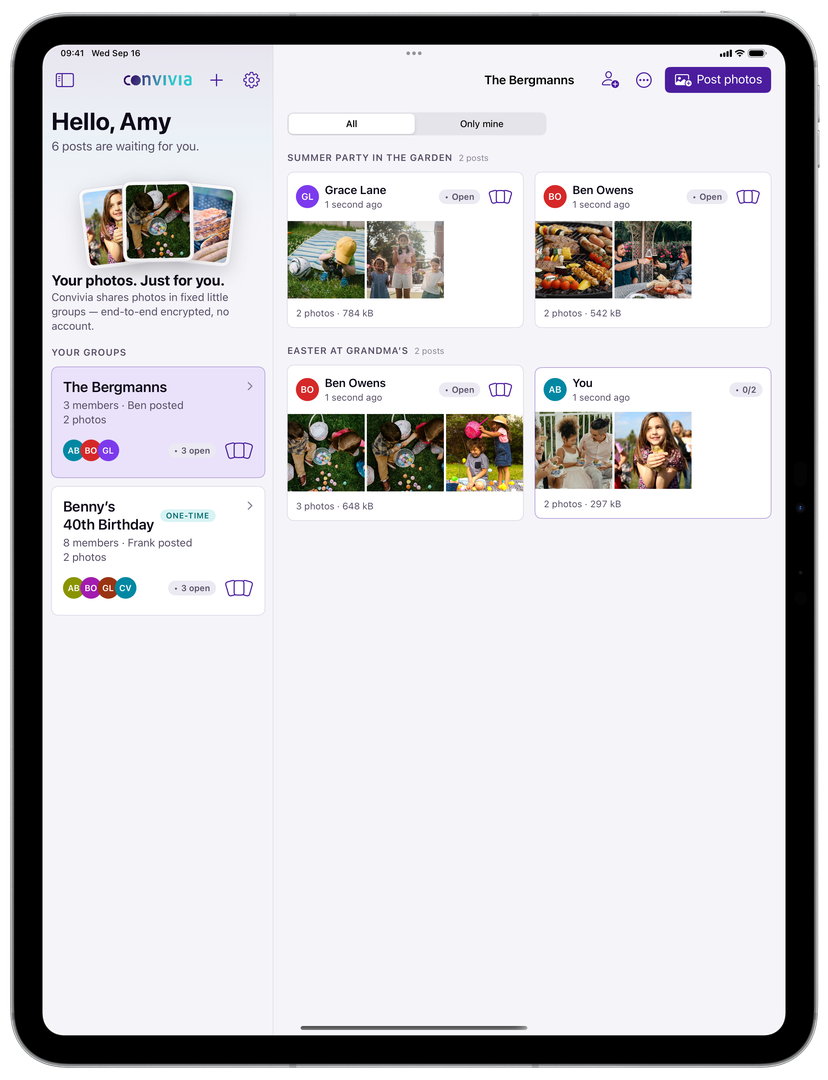

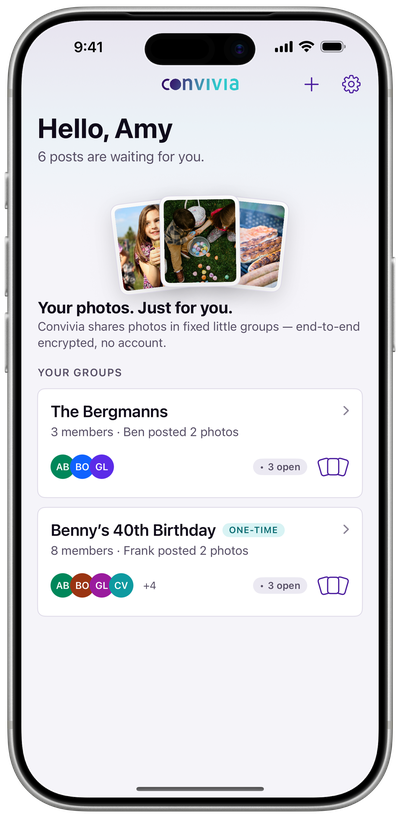
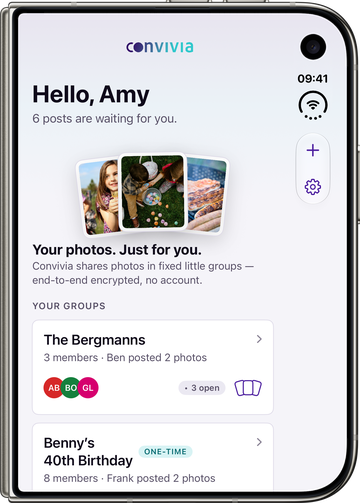
A second device does not make you a second member. Add your iPad or Mac and it checks in with your iPhone; you confirm a short code there, and your groups are simply there — under your name, without a new invitation. The others still see you, not your devices.
One purchase covers all of your devices: Convivia is one app for iPhone, iPhone Duo, iPad and Mac, not four. One thing the Mac can't do — post a Live Photo as a Live Photo; it goes out as a photo there. Saving and receiving are unaffected.
Encryption
Your photos are unreadable — to us and to Apple.
Before a photo leaves your device, it is encrypted right there. Only the devices in your group hold the key. Whatever sits in transit or in iCloud is, without that key, a pile of useless data.
There is no Convivia server. We run no database of your groups, we see no names, no posts, no timestamps. We couldn't hand over your photos if someone demanded them — we don't have them.
One gap remains: how do you know the key really comes from your grandmother and not from someone who slipped in between? No technology fixes that — the two of you do, once, when she joins.
When someone joins, both devices show the same characters
On Anna's iPhone
Identical, character for character
On Gerda's iPhone
You read the four blocks out loud to each other, once. If they match, you are directly connected and nobody sits in between. If they differ, the app aborts the join. You don't have to remember the characters — they are needed only this one time.
The technical version
On first launch, every device generates a key pair whose private half never leaves the Secure Enclave. When someone joins, two devices exchange their public keys directly; the safety number is the shortened fingerprint of both keys and exposes a machine-in-the-middle attack.
Each post gets a random content key. Photos and Live Photos are encrypted with it on the device; the content key is wrapped individually for every member with their public key. The encrypted data lives in the author's private iCloud space, not with us.
The part of the app that does the encrypting is a separate package with no dependencies — it can be read and audited without knowing the rest of the app. It is not published yet; that is still to come.
- Content
- AES-256-GCM
- Keys
- P-256 in the Secure Enclave, HPKE
- Storage
- CloudKit, the author's private space
- Recovery
- key pair in the iCloud keychain
- Our own server
- none
- Source code
- encryption not published yet
Storage
Everyone's storage holds only their own photos.
A post lives in the iCloud storage of the person who put it up. As long as you only look, it costs you nothing. Only what you save ends up in your library and takes up your space — exactly like a photo you took yourself.
- Gerda's birthday1.3 GB
- Ridge above the fog1.0 GB
- Easter at the lake0.4 GB
- free in your iCloud storage2.3 GB
Deleting is done by hand. The app doesn't tidy up behind you, because it doesn't know which day mattered to you.
Honest limits
What Convivia can't do.
-
No taking back
What someone has saved lives in their library. If you delete your post, it disappears from the group — what others saved stays with them.
-
No videos
Convivia takes photos and Live Photos. A few minutes of video would fill the author's iCloud storage all by themselves — until we have a way that holds up, videos stay out.
-
Apple devices only, for now
Convivia runs on iPhone, iPad and Mac. If you use Android or Windows, you can't join today. Whether and when that changes is open — nothing is promised.
-
No account, no password
There is no server, so there is nothing we could reset for you. The way back into your groups runs through your Apple account: a recovery key in the iCloud keychain recognises you after a reinstall. If you lose access to the Apple account, there is nothing we can do.
On the App Store
Download, start a group, invite the others.
Convivia is on the App Store, for iPhone, iPad and Mac — bought once, no subscription, no account. You start a group and send the invitation link to the people you actually share photos with. There is no more setup than that.
There is no signing up with us: we don't even get to see your email address. If something doesn't work or you're missing something, write to us — we read every message.
Convivia for iPhone, iPad and Mac
Free through October — yours for good
- an iPhone or iPad on iOS 18 or iPadOS 18 or later — or a Mac on macOS 15 or later
- an active iCloud account with some free storage
- at least one other person you actually share photos with
Common questions
The questions people ask before joining.
What happens if I mark a post done without saving anything?
Nothing lands in your library, and the author only sees the done report — whether and what you saved, the app shows to no one. What they make of it is between the two of you — the app doesn't judge.
Can I still save later?
As long as the post hasn't been deleted, yes. After that you have to ask the author; the app can't bring anything back.
How big can a group be?
Convivia is meant for circles that know each other — a family across three generations, a group of friends, a hiking crew. The app doesn't enforce a hard limit, but it is not a mailing list and feels wrong beyond a dozen people.
Can I share videos too?
No. Convivia takes photos and Live Photos, not videos. The reason is storage: a post lives in the iCloud storage of the person who put it up, and most people are on the free 5 GB there. A few minutes of video in original quality would fill that on their own — nothing would be left for the shared day. We keep looking for a way to share videos without instantly filling the storage. Until we have one, they stay out.
Do the others see how much storage I have?
No. All that's visible is how big a post is and who has marked it done.
Can I use Convivia on iPad and Mac?
Yes, and it's the same app: iPhone, iPad and Mac, one purchase. On the Mac it's a native Mac app, not a blown-up iPhone — with a fixed sidebar, keyboard shortcuts, settings in the menu bar, and photos dragged in from the Finder. Your second device asks the first one; you confirm a short code there, and your groups are simply there. Nothing changes for the others in the group: you stay one person, not a second member.
What does the app cost?
Through the end of October: nothing. Convivia is free at launch — and the window only concerns the download: get it once and it's yours for good, including all future updates. From November it's a one-time purchase — $3.99 on the US App Store, the local equivalent elsewhere. No subscription, no tiers, no in-app purchases — Convivia has no server and therefore no running costs that would justify a subscription. Everyone in the group needs the app on their own device; your own devices are covered by a single purchase, and with Apple's Family Sharing, one purchase covers the whole family.
Why is it called Convivia?
From the Latin convivium, the shared meal to which everyone brings something and from which everyone takes what they like.